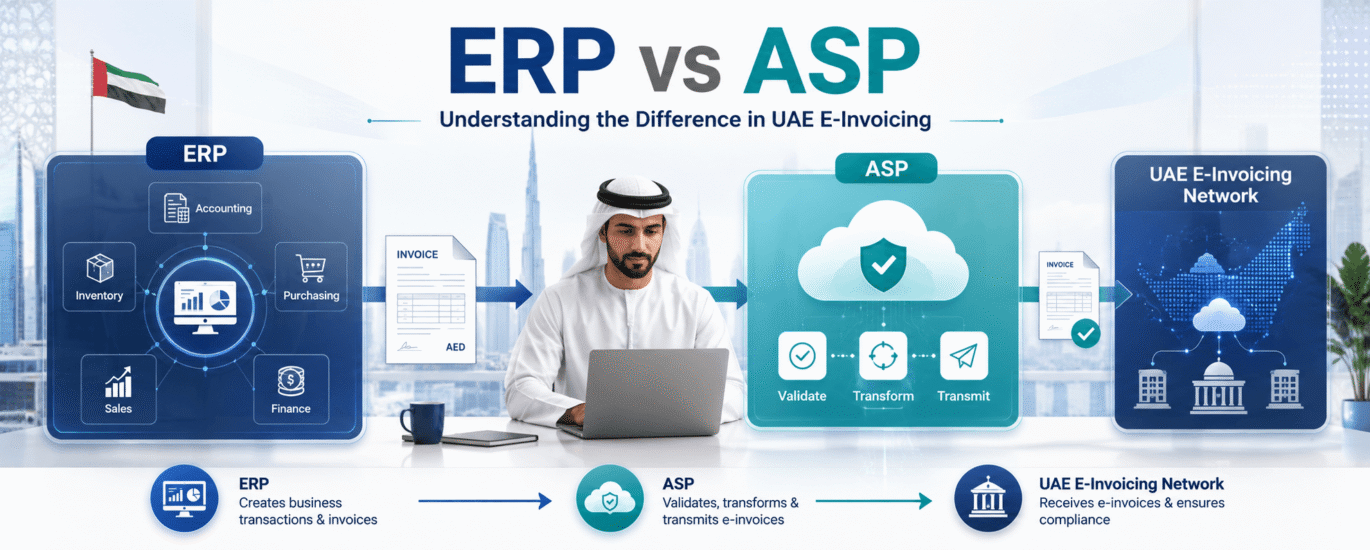
A lot of the confusion around UAE e-invoicing comes down to one question: does my existing software handle this, or do I need something new? The answer depends on understanding what your ERP does and what an ASP does. They are not interchangeable, and both are required.
Most businesses running Odoo, Sage, Tally, Zoho Books, SAP, Oracle, or Microsoft Dynamics already have a system that handles invoicing. It captures sales data, calculates VAT, generates an invoice document, and keeps a record. For years, that has been enough.
Under the UAE e-invoicing mandate, it is not enough on its own. The FTA requires every B2B tax invoice to be structured in PINT AE XML format and transmitted through a certified intermediary before it has legal standing as a tax record. That certified intermediary is the Accredited Service Provider. Your ERP and your ASP each handle a different part of the compliance process, and both are required.
Getting this distinction right early is what separates a straightforward implementation from one that runs into problems close to the October 2026 compliance deadline.
What does an ERP do in UAE e-invoicing?
Your ERP is the starting point. It holds the business data that goes into every invoice, including customer records, TRN numbers, product or service descriptions, pricing, VAT rates, and payment terms. When an invoice is raised, the ERP is responsible for assembling that data and producing the invoice document.
Under the UAE mandate, the ERP needs to produce that document as a structured PINT AE XML file rather than a PDF. This is the part that requires preparation. Some ERP platforms are being updated to support PINT AE output natively. Others require configuration, middleware, or integration work to get there. Either way, the ERP’s job ends at invoice creation. Getting that invoice to the buyer in a compliant way is the ASP’s job.
What does an ASP do in UAE e-invoicing?
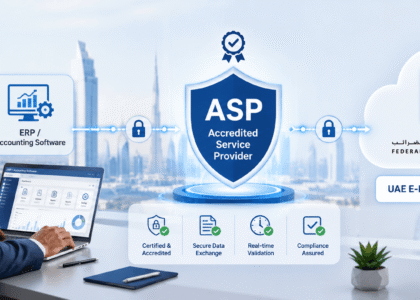
Once your ERP generates a PINT AE invoice, the Accredited Service Provider takes over. The ASP receives the invoice, validates it against FTA rules, and routes it to the buyer through the Peppol network. It is the certified transmission layer that gives the invoice its legal standing.
Put simply: the ERP builds the invoice; the ASP certifies and delivers it. Without the ASP step, even a perfectly formatted PINT AE invoice has not met the compliance requirement. It has only been created, not exchanged.
|
Your ERP Invoice creation ✓ Holds customer, supplier, and product data ✓ Calculates VAT at line-item level ✓ Generates the PINT AE XML invoice document ✓ Maintains your internal invoice records ✓ Handles credit notes and debit notes |
Your ASP Invoice transmission ✓ Receives the invoice from your ERP via API ✓ Validates it against FTA compliance rules ✓ Routes it to the buyer through the Peppol network ✓ Returns validation status and error reports ✓ Archives invoices for FTA audit purposes |
Do you need both an ERP and an ASP?
Yes. They serve different functions and neither replaces the other. Your ERP cannot transmit invoices through the Peppol network because it is not a certified access point. Your ASP cannot generate invoice data because it does not hold your business records. The compliance framework requires both to be in place and connected before your business can issue legally valid e-invoices under the UAE mandate.
Where businesses sometimes get confused is when their ERP vendor announces a UAE e-invoicing update. That update typically adds the ability to generate PINT AE output. It does not replace the need for an ASP. The update and the ASP appointment are two separate tasks, and both need to be completed well before the compliance mistakes that pile up near the deadline start to affect your readiness.
How does the ERP connect to the ASP?
The connection between your ERP and your ASP is typically made through an API integration. When an invoice is finalised in your ERP, the system sends the PINT AE XML file to the ASP’s platform automatically. The ASP validates it and returns a status — accepted, rejected, or pending — which your ERP logs against the invoice record.
The technical complexity of this connection varies depending on your ERP. Modern cloud-based platforms like Zoho Books or Odoo generally have more straightforward integration paths. Older on-premise systems or heavily customised deployments often require more development work to establish a clean API connection. When that connection breaks after go-live, the system failures that trigger FTA reporting obligations are the business’s responsibility to manage, not the ASP’s. This is one of the main reasons an ERP readiness assessment should come before ASP selection.
The full e-invoicing flow: ERP to buyer
|
1. Invoice raised in ERP: Sales data, TRN, VAT, and line items assembled into a PINT AE XML document. ↓ 2. Sent to ASP via API: ERP passes the XML invoice to the Accredited Service Provider automatically. ↓ 3. Validated by ASP: ASP checks mandatory fields, TRN accuracy, VAT calculations, and invoice structure against FTA rules. ↓ 4. Routed via Peppol network: Validated invoice delivered to the buyer’s ASP access point. ↓ 5. Received by buyer: Buyer’s system receives a compliant invoice. Status returned to your ERP for record-keeping. |
Which ERP systems are ready for UAE e-invoicing?
Most major ERP vendors have either released or announced UAE e-invoicing updates for their platforms. The practical question is not whether a module exists, but whether your specific version, configuration, and data setup are ready to use it correctly.
Which ERP systems are ready for UAE e-invoicing?
Most major ERP vendors have either released or announced UAE e-invoicing updates for their platforms. The practical question is not whether a module exists, but whether your specific version, configuration, and data setup are ready to use it correctly.
| Odoo
PINT AE module available for recent versions. Configuration and testing required. |
Sage
Sage X3, Sage Intacct, and Sage 300 users should verify localisation updates and PINT AE support. |
Zoho Books
UAE e-invoicing support is under active development. Confirm current status with Zoho. |
TallyPrime
UAE VAT compliance is in place. PINT AE XML output requires version verification. |
| SAP
Enterprise integration path available. Scope depends on version and customisation. |
Oracle
Localisation updates available for Oracle Fusion and NetSuite. Configuration work required. |
Microsoft Dynamics
UAE localisation available. PINT AE readiness depends on version and connector setup. |
Other ERPs
Custom and industry-specific ERP systems may require middleware or bespoke integrations. |
|
The ERP details above reflect vendor roadmaps as of mid-2026. Always verify current compliance status and supported versions directly with your ERP vendor before planning your implementation timeline. |
|||
What if your ERP cannot produce PINT AE output?
If your ERP does not yet support PINT AE XML output, or the vendor update is not ready in time for your compliance deadline, middleware options exist that sit between your ERP and the ASP. These middleware connectors extract invoice data from your existing system, convert it into the correct XML format, and pass it to the ASP. They add a layer to the architecture but allow businesses with older or less flexible ERP environments to meet compliance requirements without a full system replacement.
Whether middleware is the right path depends on your specific system and invoice volume. An ERP readiness assessment will surface this option early if it applies to your setup.
What is the right order to approach this?
The most common sequencing mistake is appointing an ASP before understanding what the ERP can actually deliver. If your ERP cannot produce clean PINT AE output, the ASP connection cannot be properly tested and onboarding stalls. The right order is: assess your ERP first, establish what output it can produce and what work is needed, then select and onboard an ASP that is compatible with your system and timelines.
Given that UAE e-invoicing integration involves ERP configuration and ASP onboarding running in sequence, the total preparation time is longer than either task on its own. Starting early enough to do both properly is the single most practical step available to any business working toward the October 2026 deadline.
Frequently asked questions
What is the difference between an ERP and an ASP in UAE e-invoicing?
Your ERP handles invoice creation, assembling business data into a structured PINT AE XML document. Your ASP handles invoice transmission, validating that document and routing it to the buyer through the Peppol network. Both are required for UAE e-invoicing compliance and neither replaces the other.
Do I need both an ERP and an ASP?
Yes. The UAE e-invoicing framework requires invoices to be generated in PINT AE format (ERP responsibility) and transmitted through a certified Accredited Service Provider (ASP responsibility). A business cannot meet the FTA compliance requirement with only one of these in place.
Can my ERP software handle UAE e-invoicing on its own?
No. Your ERP can generate a PINT AE-compliant invoice, but it cannot transmit that invoice through the Peppol network or validate it against FTA rules. That is the ASP’s role. Even if your ERP vendor releases a UAE e-invoicing module, an Accredited Service Provider is still required for compliant invoice exchange.
Which ERP systems are ready for UAE e-invoicing?
Most major platforms including Odoo, Sage, SAP, Oracle, Microsoft Dynamics, Zoho Books, and TallyPrime have UAE e-invoicing updates in progress or available. Readiness depends on your specific version and configuration. Verify current support status directly with your vendor and confirm your setup can produce valid PINT AE XML output before planning your ASP onboarding.
How does an ERP connect to an ASP?
The connection is typically made through an API integration. Your ERP sends the PINT AE XML invoice to the ASP automatically when an invoice is finalised. The ASP validates it and returns a status to your ERP. The complexity of this integration depends on your ERP platform and how it is currently configured.
What if my ERP cannot produce PINT AE output?
Middleware connectors can bridge the gap between an ERP that does not yet support PINT AE XML and an ASP. These extract invoice data from your existing system and convert it to the correct format before passing it on. Whether this is the right path depends on your ERP environment and invoice volume. See the full UAE e-invoicing implementation timeline to understand how much preparation time you have.
Not sure whether your ERP is ready to connect with an ASP? Hitech assesses your current setup and handles the integration so both sides work together before your compliance deadline.